Home
/
Blog
/
Tech Tutorials
/
Introduction to Object Detection

Introduction to Object Detection

Author
Shubham Gupta
Calendar Icon
August 7, 2018
Timer Icon
3 min read
Share

Explore this post with:

Humans can easily detect and identify objects present in an image. The human visual system is fast and accurate and can perform complex tasks like identifying multiple objects and detect obstacles with little conscious thought. With the availability of large amounts of data, faster GPUs, and better algorithms, we can now easily train computers to detect and classify multiple objects within an image with high accuracy. In this blog, we will explore terms such as object detection, object localization, loss function for object detection and localization, and finally explore an object detection algorithm known as “You only look once” (YOLO).

Object Localization

An image classification or image recognition model simply detect the probability of an object in an image. In contrast to this, object localization refers to identifying the location of an object in the image. An object localization algorithm will output the coordinates of the location of an object with respect to the image. In computer vision, the most popular way to localize an object in an image is to represent its location with the help of bounding boxes. Fig. 1 shows an example of a bounding box.

bounding box, object detection, localization, self driving cars, computer vision, deep learning, classfication
Fig 1. Bounding box representation used for object localization

A bounding box can be initialized using the following parameters:

  • bx, by : coordinates of the center of the bounding box
  • bw : width of the bounding box w.r.t the image width
  • bh : height of the bounding box w.r.t the image height

Defining the target variable

The target variable for a multi-class image classification problem is defined as:

Loss Function

Since we have defined both the target variable and the loss function, we can now use neural networks to both classify and localize objects.

Machine learning challenge, ML challenge

Object Detection

An approach to building an object detection is to first build a classifier that can classify closely cropped images of an object. Fig 2. shows an example of such a model, where a model is trained on a dataset of closely cropped images of a car and the model predicts the probability of an image being a car.

object detection, localization, self driving cars, computer vision, deep learning, classification
Fig 2. Image classification of cars

Now, we can use this model to detect cars using a sliding window mechanism. In a sliding window mechanism, we use a sliding window (similar to the one used in convolutional networks) and crop a part of the image in each slide. The size of the crop is the same as the size of the sliding window. Each cropped image is then passed to a ConvNet model (similar to the one shown in Fig 2.), which in turn predicts the probability of the cropped image is a car.

Fig 3. Sliding windows mechanism

After running the sliding window through the whole image, we resize the sliding window and run it again over the image again. We repeat this process multiple times. Since we crop through a number of images and pass it through the ConvNet, this approach is both computationally expensive and time-consuming, making the whole process really slow. Convolutional implementation of the sliding window helps resolve this problem.

Convolutional implementation of sliding windows

Before we discuss the implementation of the sliding window using convents, let’s analyze how we can convert the fully connected layers of the network into convolutional layers. Fig. 4 shows a simple convolutional network with two fully connected layers each of shape (400, ).
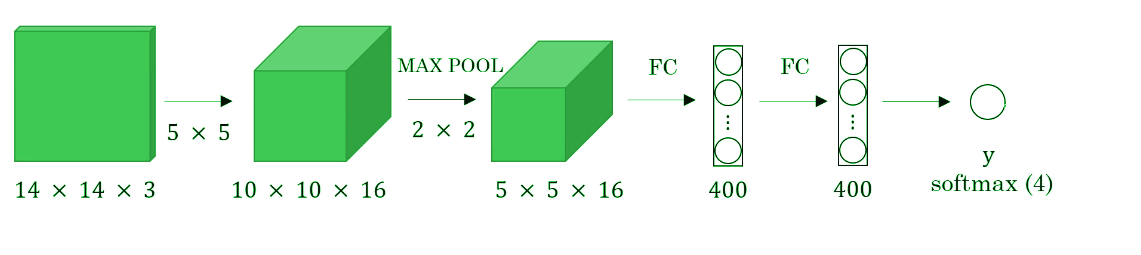
convolutional sliding window, sliding window, 1d convolution, yolo, object detection
Fig 4. Sliding windows mechanism

A fully connected layer can be converted to a convolutional layer with the help of a 1D convolutional layer. The width and height of this layer are equal to one and the number of filters are equal to the shape of the fully connected layer. An example of this is shown in Fig 5.

full connected layer to 1d convolution, 1 d convolution, full connected layers, dense layers
Fig 5. Converting a fully connected layer into a convolutional layer

We can apply this concept of conversion of a fully connected layer into a convolutional layer to the model by replacing the fully connected layer with a 1-D convolutional layer. The number of the filters of the 1D convolutional layer is equal to the shape of the fully connected layer. This representation is shown in Fig 6. Also, the output softmax layer is also a convolutional layer of shape (1, 1, 4), where 4 is the number of classes to predict.

full convolutional networks , converting dense layers to convolutional layers, computer vision, object detection, object localization
Fig 6. Convolutional representation of fully connected layers.

Now, let’s extend the above approach to implement a convolutional version of sliding window. First, let’s consider the ConvNet that we have trained to be in the following representation (no fully connected layers).

object detection, localization, self driving cars, computer vision, deep learning, classification

Let’s assume the size of the input image to be 16× 16× 3. If we’re to use a sliding window approach, then we would have passed this image to the above ConvNet four times, where each time the sliding window crops a part of the input image of size 14× 14× 3 and pass it through the ConvNet. But instead of this, we feed the full image (with shape 16× 16 × 3) directly into the trained ConvNet (see Fig. 7). This results in an output matrix of shape 2 × 2 × 4. Each cell in the output matrix represents the result of a possible crop and the classified value of the cropped image. For example, the left cell of the output (the green one) in Fig. 7 represents the result of the first sliding window. The other cells represent the results of the remaining sliding window operations.

Convolutional sliding window, fully convolutional network, sliding window, object detection, object localization, yolo, rcnn, computer vision, perception, self driving cars
Fig 7. Convolutional implementation of the sliding window

Note that the stride of the sliding window is decided by the number of filters used in the Max Pool layer. In the example above, the Max Pool layer has two filters, and as a result, the sliding window moves with a stride of two resulting in four possible outputs. The main advantage of using this technique is that the sliding window runs and computes all values simultaneously. Consequently, this technique is really fast. Although a weakness of this technique is that the position of the bounding boxes is not very accurate.

The YOLO (You Only Look Once) Algorithm

A better algorithm that tackles the issue of predicting accurate bounding boxes while using the convolutional sliding window technique is the YOLO algorithm. YOLO stands for you only look once and was developed in 2015 by Joseph Redmon, Santosh Divvala, Ross Girshick, and Ali Farhadi. It’s popular because it achieves high accuracy while running in real time. This algorithm is called so because it requires only one forward propagation pass through the network to make the predictions.

The algorithm divides the image into grids and runs the image classification and localization algorithm (discussed under object localization) on each of the grid cells. For example, we have an input image of size 256 × 256. We place a 3× 3 grid on the image (see Fig. 8).

YOLO algorithm, you only look once, Joseph Redmon, Computer vision, pattern recognition, Real time object detection
Fig. 8 Grid (3 x 3) representation of the image

Next, we apply the image classification and localization algorithm on each grid cell. For each grid cell, the target variable is defined as

Do everything once with the convolution sliding window. Since the shape of the target variable for each grid cell is 1 × 9 and there are 9 (3 × 3) grid cells, the final output of the model will be:

YOLO algorithm, you only look once, Joseph Redmon, Computer vision, pattern recognition, Real time object detection

The advantages of the YOLO algorithm is that it is very fast and predicts much more accurate bounding boxes. Also, in practice to get more accurate predictions, we use a much finer grid, say 19 × 19, in which case the target output is of the shape 19 × 19 × 9.

Conclusion

With this, we come to the end of the introduction to object detection. We now have a better understanding of how we can localize objects while classifying them in an image. We also learned to combine the concept of classification and localization with the convolutional implementation of the sliding window to build an object detection system. In the next blog, we will go deeper into the YOLO algorithm, loss function used, and implement some ideas that make the YOLO algorithm better. Also, we will learn to implement the YOLO algorithm in real time.

Have anything to say? Feel free to comment below for any questions, suggestions, and discussions related to this article. Till then, keep hacking with HackerEarth.

Subscribe to The HackerEarth Blog

Get expert tips, hacks, and how-tos from the world of tech recruiting to stay on top of your hiring!

Author
Shubham Gupta
Calendar Icon
August 7, 2018
Timer Icon
3 min read
Share

Hire top tech talent with our recruitment platform

Access Free Demo
Related reads

Discover more articles

Gain insights to optimize your developer recruitment process.

Introducing HackerEarth OnScreen: AI-powered interviews, around the clock

Introducing HackerEarth OnScreen: AI-powered interviews, around the clock

Tech hiring has a blind spot, and it's not the resume pile, the take-home tests, or even the interview itself. It's the gap between when a great candidate applies and when your team is available to talk to them. That gap costs you more top talent than any competitor does.

Today, HackerEarth OnScreen closes it permanently.

The real cost of scheduling friction

Most companies assume they lose candidates to better offers. The data tells a different story.

A developer weighing two opportunities almost always moves forward with the company that responded first, not the one that sent a calendar invite for Thursday. AI-generated resumes have flooded inboxes, making screening harder. Engineering teams the people best positioned to evaluate technical depth have limited hours. Recruiters are under pressure to move faster while maintaining quality.

Something had to change.

What OnScreen does

OnScreen doesn't just automate scheduling. It conducts the interview.

A candidate who applies at 11 PM gets a full interview before Monday morning through lifelike AI avatars with built-in identity verification and proctoring. The experience is a genuine two-way conversation: dynamic, adaptive, and role-calibrated. This is not a chatbot filling out a scorecard.

One enterprise customer screened more than 2,000 candidates in a single weekend with complete consistency and zero interviewer bias.

"Recruiters are under pressure more than ever. The volume of applicants has surged, AI-generated resumes have made initial screening harder, and the risk of missing the right candidate keeps climbing. OnScreen was built so that no qualified candidate is overlooked because nobody was available to interview them."
— Vikas Aditya, CEO, HackerEarth

Three capabilities, combined for the first time

In-depth interviewing that evaluates reasoning, not recall.
OnScreen conducts dynamic technical conversations that adapt to how each candidate responds. It probes the depth of knowledge, follows threads, and evaluates the quality of thinking behind each answer not just whether the answer is correct. Every interview runs on a deterministic framework: the same structure for every candidate and no panel-to-panel variation.

Integrated proctoring, built in from the start:
Enterprise-grade proctoring is woven directly into the interview flow not bolted on as an afterthought. Legitimate candidates won't notice it. The ones who shouldn't be in your pipeline will.

KYC-grade candidate verification
OnScreen brings identity verification standards from financial services into technical hiring. Proxy candidates, resume misrepresentation, and skills that don't match the application – all three gaps were closed at the source.

What hiring teams are saying

"Before OnScreen, we had no reliable way to measure candidate quality, especially with the rise of AI-generated CVs. Now, screening is far more objective. Roles that previously took much longer are now being closed within three to four weeks."
— Pawan Kuldip, Head of Human Resources, Discover Dollar Inc.

Built for everyone in the process

For engineering teams:
Fewer hours on screening calls. Senior engineers focus on final-round conversations, not first-pass filters.

For recruiters:
Pipelines that move. Candidates evaluated and scored before the week starts.

For candidates:
A consistent, skills-first experience, regardless of when they apply or where they're located.

OnScreen integrates directly into HackerEarth's existing platform alongside Hiring Challenges, Technical Assessments, and FaceCode. It extends your interviewing capacity without adding headcount.

The hiring bar just got higher. Everywhere.

Top talent expects swift, fair processes. Companies that deliver both, at scale, around the clock, will hire the engineers everyone else is still scheduling calls about.

OnScreen is now live for enterprise customers. Request access at hackerearth.com/ai/onscreen.

HackerEarth powers technical hiring at Google, Amazon, Microsoft, and 500+ global enterprises. The platform supports 10M+ developers across 1,000+ skills and 40+ programming languages.

What It Takes to Keep Gen Z Engaged and Growing at Work

What It Takes to Keep Gen Z Engaged and Growing at Work

Engaging Gen Z employees is no longer an HR checkbox. It's a competitive advantage.

Companies that get this right aren’t just filling roles. They’re building future-ready teams, deepening loyalty, and winning the talent market before competitors even realize they’re losing it.

Why Gen Z is Rewriting the Rules

Gen Z didn’t just enter the workforce. They arrived with a different operating system.

  • They’ve grown up with instant access, real-time feedback, and limitless choice. When work feels slow, rigid, or disconnected, they don’t wait it out. They move on. Retention becomes a live problem, not a future one.
  • They expect technology to be intuitive and fast, communication to be direct and low-friction, and their employer to reflect values in daily action, not just annual reports.

The consequence: Outdated systems and poor employee experiences don’t just frustrate Gen Z. They accelerate attrition.

Millennials vs Gen Z: Similar Generation, Different Expectations

These two cohorts are often grouped together. They shouldn’t be.

The distinction matters because solutions designed for Millennials often fall flat for Gen Z. Understanding who you’re designing for is where effective engagement strategy begins.

Gen Z’s Relationship with Loyalty

Loyalty, for Gen Z, is earned, not assumed.

  • They challenge outdated processes and push for tech-enabled workflows.
  • They constantly evaluate whether their current role offers the growth, flexibility, and purpose they need. If it doesn’t, they start looking elsewhere.

Key insight: This isn’t disloyalty. It’s clarity about what they want. Organizations that align experiences with these expectations gain a competitive edge.

  • High turnover is the cost of ignoring this.
  • Stronger teams are the reward for getting it right.

What Actually Works

1. Rethink Workplace Technology

  • Outdated tools may be invisible to older employees, but Gen Z sees them immediately.
  • Modern HR tech and collaboration platforms improve efficiency and signal investment in people.
  • Invest in tools that reduce friction and enhance daily experience, not just track performance.

2. Flexibility with Clear Accountability

  • Gen Z values autonomy, but also needs clarity to thrive.
  • Hybrid and remote models work when paired with well-defined goals and explicit ownership.
  • Focus on outcomes, not hours. Autonomy with accountability is a combination Gen Z respects.

3. Continuous Feedback, Not Annual Reviews

  • Annual performance reviews feel outdated. Gen Z expects real-time feedback loops.
  • Frequent, actionable feedback helps employees improve faster and signals that their growth matters.
  • Make feedback a weekly habit, not a twice-yearly event.

4. Make Growth Visible

  • If career paths aren’t clear, Gen Z won’t wait. They’ll look elsewhere.
  • Internal mobility, structured learning paths, and reskilling opportunities signal future potential.
  • Invest in learning and development and make career trajectories explicit.

5. Build Real Belonging

  • Inclusion must show up in daily interactions, not just company values documents.
  • Inclusive environments where diverse perspectives are genuinely sought produce better decisions and stronger engagement.
  • Gen Z quickly notices when DEI is performative. Build it into everyday interactions.

6. Connect Work to Purpose

  • Gen Z wants to see how their work matters in a direct, traceable way.
  • Linking individual roles to tangible business outcomes increases ownership and engagement.
  • Purpose-driven work isn’t a perk. It’s a retention strategy.

7. Prioritize Well-Being

  • Burnout is a performance problem before it becomes attrition.
  • Mental health support, sustainable workloads, and genuine flexibility reduce stress and sustain engagement.
  • Policies must be real in practice. Gaps erode trust.

How to Attract Gen Z from the Start

Job Descriptions That Tell the Truth

  • Generic postings don’t convert Gen Z candidates. They want specifics: remote or hybrid expectations, real growth opportunities, and culture in practice.
  • Transparent job descriptions attract better-fit candidates and reduce early attrition.

Skills Over Experience

  • Gen Z and organizations hiring them increasingly value potential over tenure.
  • Skills-based hiring opens access to a broader, more diverse talent pool and builds teams equipped for change.
  • Hire for capability and future-readiness, not just years on a resume.

The Bottom Line

Retaining Gen Z isn’t about perks. It’s about rethinking the employee experience from the ground up.

  • Flexibility without accountability fails.
  • Purpose without visibility is hollow.
  • Growth that isn’t visible or structured drives attrition faster than most organizations realize.

The payoff: When organizations combine the right technology, real flexibility, continuous feedback, visible growth paths, and genuine inclusion:

  • Gen Z doesn’t just stay. They perform at a higher level.
  • Adaptive, future-forward thinking compounds over time.

That’s what separates organizations that thrive in today’s talent market from those constantly replacing people who left for somewhere better.

AI Tools for HR Managers in 2026: What's Actually Working (And What Isn't)

The current state of AI adoption in HR
88% of HR leaders say their organizations have not yet realized significant business value from AI. That number is striking, given that 91% of CHROs now rank AI as their single top priority. The gap is not a technology problem it is an adoption and strategy problem. Most HR teams have added AI to their workflows in some form, but very few have moved past experimentation into real, measurable impact.

This guide is for HR managers who want to change that. Not a list of tools to bookmark and forget, but a clear-eyed look at where AI is delivering results in 2026, what separates the tools that work from the ones that don't, and how to actually use them.

The adoption gap that most HR leaders aren't talking about

AI is present but underutilized.
According to the SHRM State of AI in HR 2026 report, 62% of organizations use AI somewhere in their business. But only 11% have embedded AI into daily workflows, defined as more than 60% of employees using it daily. That is a significant divide and explains why so many AI investments feel underwhelming.

Managers experiment more than employees.
A July 2025 Gartner survey of 2,986 employees found that 46% of managers are experimenting with AI, compared to just 26% of employees. Most organizations encourage exploration but fail to provide the structure, expectations, or training needed to make AI stick. Only 7% of organizations give employees guidance on how to use the time AI saves them.

The result: wasted potential.
Workforces have access to powerful tools but no framework for using them strategically. AI becomes another tab open in the browser, rather than a fundamental shift in how work gets done.

The opportunity is real.
Organizations that have moved from experimentation to integration are seeing tangible outcomes:

  • AI-powered recruitment tools reduce time-to-hire by an average of 30 days.
  • AI automates up to 60% of routine HR tasks, saving employees five or more hours per week.
  • Predictive analytics reduces voluntary turnover by 22–28% in the first year of deployment.

Capturing this opportunity requires the right tools and the right strategy.

Why 2026 is different from every other year of "AI in HR"

1. Skills-based hiring has gone mainstream.
Josh Bersin's 2026 Talent Report found that 72% of companies are moving away from degree requirements in favor of skills-based evaluation. Gartner reports that 65% of enterprises are actively prioritizing it. The traditional resume is no longer the most reliable signal of candidate quality, especially in tech roles where the half-life of skills is just two years.

2. Agentic AI has arrived.
Earlier generations of HR AI could automate tasks or analyze data. Agentic AI can plan, act, and iterate across entire workflows without constant human direction. 48% of large companies have already adopted agentic AI in HR, with projections showing 327% growth by 2027. This is no longer experimental.

3. Regulatory pressure is real.
The EU AI Act now classifies hiring AI as high-risk, making transparency and audit trails a legal requirement. Any AI tool influencing hiring decisions must be explainable. Black-box systems are a compliance liability.

What separates genuinely useful HR AI tools from the rest

They augment judgment rather than replace it.
Great HR AI tools make professionals better at their jobs. They surface the right information at the right moment, flag unnoticed patterns, and reduce cognitive load. Tools that try to remove humans entirely create legal risk and distrust. 88% of HR leaders haven’t seen ROI largely because their tools automate the wrong things.

They generate actionable insight, not just output.
Predictive models identify at-risk employees six months before they leave, skills-gap analyses shape hiring plans before a role opens, and candidate matching highlights transferable potential. This is the difference between AI that saves time and AI that changes decisions.

They are transparent and explainable.
Employees trust AI-generated reviews twice as often when they understand the criteria. 67% of candidates accept AI screening as long as a human makes the final call and the process is explained. Transparency builds trust, drives adoption, and ensures compliance.

Top AI tools for HR managers in 2026

HireVue
Standard for AI-powered video interviews and structured candidate assessments at scale. Cuts time-to-hire by 50%, supports 40+ languages, and uses IO psychologist-vetted guides. Bias audits and deterministic algorithms ensure fairness. Ideal for regulated industries and high-volume hiring.

Eightfold AI
Built for skills-first talent strategy. Maps 1.6 billion career profiles to a skills graph, matching candidates on potential rather than keywords. Increases recruiter productivity by 50%+ and reduces diversity sourcing time by 85%. Best for large enterprises focused on internal mobility and workforce planning.

Workday
Comprehensive HR platform with agentic AI for workforce planning, analytics, and employee lifecycle management. Acquisition of HiredScore integrates AI recruiting orchestration. Suitable for organizations needing a single system for headcount planning to performance reviews.

Lattice
Focuses on employee performance and engagement. AI identifies growth patterns, surfaces feedback trends, and flags disengagement early. Predictive models detect at-risk employees six months in advance, enabling targeted retention strategies. Ideal for culture and retention-focused organizations.

HackerEarth
Covers full tech hiring lifecycle, from sourcing developers through hackathons to live technical interviews. OnScreen AI interview agent uses lifelike avatars for structured, bias-free interviews. Ensures verification and cheat-proof processes. Trusted by Google, Amazon, Microsoft, Barclays, and Walmart.

Moving from experimentation to impact: a practical framework

1. Start with one high-friction problem.
Automate workflows that cost the most time or cause the most inconsistency typically initial candidate screening. Measure outcomes to justify next investments.

2. Define success before deployment.
47% of CHROs haven’t established clear AI productivity metrics. Set baseline and target improvements: time-to-shortlist, quality-of-hire, recruiter hours per hire anything trackable.

3. Put managers in the loop.
AI adoption gaps are often a manager problem. Give managers specific use cases, integrate AI into workflows, and provide language to discuss it with their teams.

The bottom line

AI will not change HR’s fundamental nature it remains a people function requiring judgment, empathy, and context. What AI improves is:

  • The quality of information available for every decision.
  • The time HR teams spend on work that doesn’t require judgment.

Organizations getting ahead in 2026 are those that select the right tools for the right problems and give teams structure to use them effectively. That is where the real advantage lies.

Top Products

Explore HackerEarth’s top products for Hiring & Innovation

Discover powerful tools designed to streamline hiring, assess talent efficiently, and run seamless hackathons. Explore HackerEarth’s top products that help businesses innovate and grow.
Frame
Hackathons
Engage global developers through innovation
Arrow
Frame 2
Assessments
AI-driven advanced coding assessments
Arrow
Frame 3
FaceCode
Real-time code editor for effective coding interviews
Arrow
Frame 4
L & D
Tailored learning paths for continuous assessments
Arrow
Get A Free Demo